
MATLAB and Simulink are frequently mentioned together, and while closely integrated, they serve genuinely distinct purposes that students benefit from understanding clearly rather than treating as interchangeable or confusing one for a mere feature of the other. This article explains the real difference and when each genuinely makes sense to use.
What MATLAB Actually Is
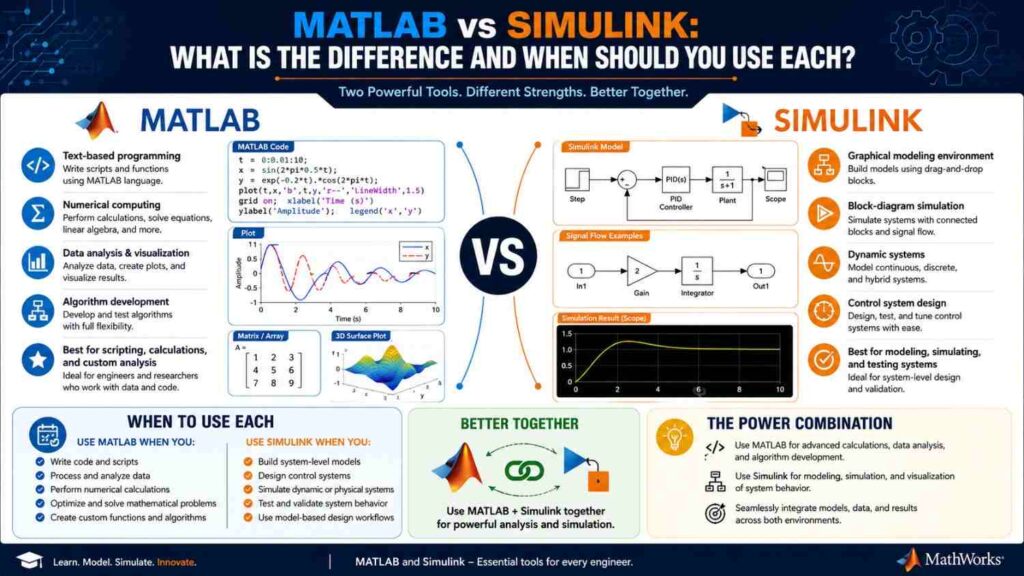
MATLAB is fundamentally a script-based programming environment and language, specifically designed for numerical computing, matrix operations, and technical computing, where you write code, in MATLAB’s specific programming language, to perform calculations, analyze data, and create visualizations, discussed in more depth in our dedicated MATLAB skills article.
What Simulink Actually Is
Simulink is a graphical, block-diagram-based environment built on top of MATLAB, specifically designed for modeling, simulating, and analyzing dynamic systems, where instead of writing code line by line, you connect visual blocks representing system components (transfer functions, signal sources, mathematical operations) to build a model of how a system behaves over time.
The Core Practical Difference
The genuine practical difference comes down to representation and typical use case: MATLAB’s script-based approach suits numerical analysis, data processing, algorithm development, and calculations where you’re working with discrete computational steps, while Simulink’s graphical, block-based approach suits modeling and simulating continuous or discrete dynamic systems, where visualizing the system’s structure and signal flow provides genuine intuitive value beyond what code alone would offer.
A Direct Comparison Table
| Factor | MATLAB | Simulink |
|---|---|---|
| Interface style | Text-based scripting/coding | Graphical block diagrams |
| Best suited for | Numerical analysis, algorithms, data processing | Dynamic system modeling and simulation |
| Typical use cases | Signal processing, data analysis, custom algorithms | Control system simulation, system-level modeling |
| Learning curve for beginners | Requires learning MATLAB’s programming syntax | Often more visually intuitive initially |
Why They’re Genuinely Designed to Work Together
Rather than being competing alternatives, MATLAB and Simulink are specifically designed for integrated use: you can call MATLAB scripts and functions from within Simulink models, use MATLAB to analyze and visualize data generated by Simulink simulations, and combine both tools’ strengths within a single project workflow, making genuine proficiency in both, rather than choosing one exclusively, the most practically valuable approach for most students.
When to Reach for MATLAB Specifically
MATLAB scripting is generally the better choice for tasks involving custom algorithm development, data analysis and processing, signal processing applications, discussed in our dedicated MATLAB skills article, and situations where you need fine-grained programmatic control over calculations that would be awkward or impractical to represent as visual block diagrams.
When to Reach for Simulink Specifically
Simulink is generally the better choice for control system design and simulation, discussed in our dedicated control systems article, modeling physical systems with clear component structure (mechanical, electrical, or hybrid systems), and situations where visualizing signal flow and system structure genuinely aids understanding and communication, particularly valuable for complex, multi-component system models.
Learning Path Recommendations for Students
Building foundational MATLAB scripting competency first generally makes sense, since Simulink builds on and integrates with MATLAB concepts, before moving into Simulink specifically once you have particular modeling and simulation needs, typically arising from control systems, power systems, or other specialization-specific coursework requiring dynamic system modeling.
A Practical Example of When You’d Genuinely Use Both Together
Consider designing a motor speed controller: you might use Simulink to build and visualize the complete system model, motor dynamics, controller, and feedback loop, then use MATLAB scripting to sweep through different controller parameter values, analyze the resulting performance data, and generate comparison plots, a genuinely common workflow illustrating why proficiency in both tools together, rather than either in isolation, provides the most practical, complete capability for real engineering problems.
Which Skill Employers Actually Screen For During Interviews
In practice, many employers and interviewers assess genuine MATLAB scripting comfort first, since it underlies broader problem-solving and analytical ability applicable across many roles, before probing Simulink experience specifically for roles genuinely involving system-level modeling and simulation work; students uncertain where to focus limited preparation time before interviews are generally better served ensuring genuinely solid MATLAB fundamentals first, then highlighting whatever specific Simulink project experience they have as a meaningful complement rather than the primary basis of their technical preparation.
Common Misconceptions
- “Simulink is simply a more advanced or more difficult version of MATLAB.” They serve genuinely different purposes with different interaction paradigms, not a simple difficulty progression from one to the other.
- “You must choose one tool exclusively rather than learning both.” They’re specifically designed for integrated, complementary use within the same projects and workflows.
- “Simulink’s visual interface means it requires less genuine technical understanding than MATLAB scripting.” Effective Simulink use requires genuine understanding of the underlying systems and mathematical concepts being modeled, not just visual interface familiarity.
Frequently Asked Questions
Do I need a separate license for Simulink beyond a standard MATLAB license?
Typically yes, Simulink usually requires its own license alongside MATLAB, though student licensing packages, discussed in our dedicated MATLAB skills article, often bundle both together at reduced or free cost for students through university arrangements.
Which tool should I prioritize learning first if I have limited time?
Generally MATLAB scripting fundamentals first, since this provides the broader foundational skill set applicable across more situations, before specializing into Simulink once you have specific modeling needs from your coursework or projects.
Is Simulink knowledge specifically expected by employers, or is MATLAB alone generally sufficient?
This depends significantly on your specific specialization and target employers; control systems, power systems, and automotive-related roles often specifically value Simulink experience, while some other specializations may place relatively more emphasis on MATLAB scripting alone.
Final Thoughts
MATLAB and Simulink serve genuinely distinct but complementary purposes, script-based numerical computing versus graphical dynamic system modeling, and building competency in both, understanding when each genuinely suits a particular problem, provides the most practically valuable skill set for electrical engineering students. Rather than viewing them as competing alternatives, understanding their integrated, complementary design helps you use each tool where it genuinely adds the most value.