
Every automated system, from a streetlight that switches on at dusk to a solar charge controller protecting a battery bank, depends on one basic ability: sensing what is happening in the physical world.
Sensors are the eyes and ears of electronic systems, and understanding how they work is one of the earliest and most important building blocks in electronics and embedded systems study.
This article explains what a sensor is, how it fits into a larger system, and the main categories you will encounter as a student or hobbyist.
What a Sensor Does
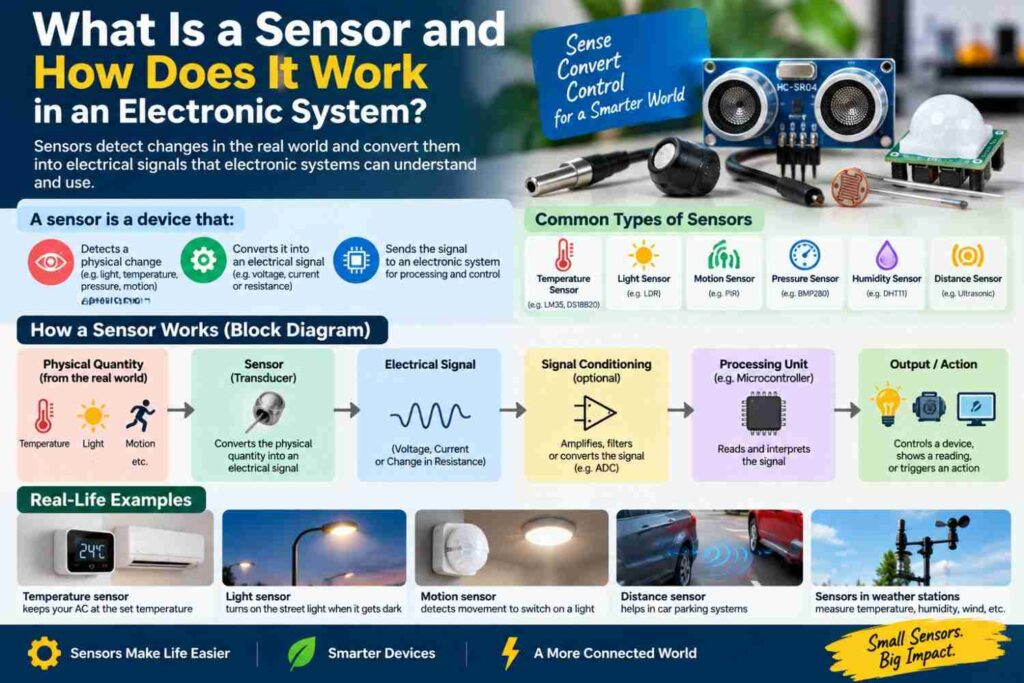
A sensor is a device that detects a physical quantity, such as temperature, light, pressure, distance, or motion, and converts it into an electrical signal that a circuit or microcontroller can interpret. Without sensors, an electronic system has no way of knowing what is happening around it.
A room could not automatically dim its lights, a robot could not avoid an obstacle, and an automatic voltage regulator could not respond to a changing generator load. The sensor is the first link in a chain that leads to a decision and an action.
How a Sensor Fits Into a System
Sensors rarely work alone. In a typical embedded system, a sensor detects a physical condition, sends a raw electrical signal to a signal conditioning stage, which may amplify or filter it, and then passes the cleaned-up signal to a microcontroller or processor for interpretation.
The system then makes a decision based on that reading and triggers an actuator, such as a motor, relay, or display, to respond. This sense-decide-act loop is the foundation of almost every automated system, whether it is a simple light-activated switch or a full industrial control panel governed by a PLC, a topic covered in depth in our dedicated PLC programming article.
Analog and Digital Sensor Outputs
Sensors generally produce one of two types of output, and understanding this distinction matters when wiring a project. An analog sensor, such as a basic light dependent resistor or a thermistor, produces a continuously varying voltage that represents the measured quantity across a range.
A digital sensor produces a signal that is either on or off, or that communicates readings as discrete data over a protocol. The broader difference between these two signal types is explored more fully in our analog versus digital signals article, but the short version is that analog signals carry smooth, continuous information while digital signals carry discrete, stepped information that is easier for a microcontroller to process cleanly.
Common Types of Sensors Used in Student Projects
A wide range of sensors shows up repeatedly in Nigerian student and hobbyist projects because they are affordable, easy to interface with Arduino and similar boards, and widely available from local electronics dealers.
| Sensor Type | What It Measures | Typical Use Case |
|---|---|---|
| LDR (Light Dependent Resistor) | Light intensity | Automatic street or security lighting |
| Thermistor / DHT11 | Temperature and humidity | Climate control, incubators |
| Ultrasonic (HC-SR04) | Distance | Obstacle avoidance, parking sensors |
| PIR motion sensor | Infrared motion | Security systems, automatic lighting |
| Current sensor (ACS712) | Electrical current | Load monitoring, energy metering |
| Voltage divider / sensor module | Battery or supply voltage | Solar charge controllers, battery monitors |
Choosing the Right Sensor for a Project
Selecting a sensor is not just about picking whatever measures the right quantity; it also involves matching the sensor’s output range, response speed, power requirements, and accuracy to what the project actually needs. A few practical steps help narrow down the choice.
- Identify exactly what physical quantity needs to be measured and over what range of values.
- Check whether the sensor’s output is analog or digital, and confirm your microcontroller can read that type of signal.
- Confirm the sensor’s operating voltage matches your board, since mismatched voltages can damage components.
- Consider response time; a sensor that updates slowly may not suit a fast-changing process.
- Factor in cost and local availability, since a sensor that is hard to source locally can delay a project during SIWES or final year work.
Sensors in Real-World Nigerian Applications
Sensors are already at work in systems many Nigerian students interact with daily. Solar charge controllers use voltage and current sensors to decide how much charge to send into a battery, a process closely tied to the pulse width modulation and MPPT concepts covered in our solar charge controller article.
Generator automatic voltage regulators use voltage sensing to adjust excitation and keep output stable. Even simple inverter systems rely on current sensing to protect against overload. Recognizing these everyday examples makes the abstract idea of a sensor much more concrete.
Calibration and Accuracy Considerations
A sensor’s raw reading is rarely perfect straight out of the box. Manufacturing tolerances, temperature drift, and wiring noise can all introduce small errors.
Calibration involves comparing the sensor’s output against a known reference and adjusting the reading, either through hardware trimming or in software, so it reflects the true value more accurately.
For student projects, even a simple software calibration, such as applying an offset after comparing readings to a trusted thermometer or multimeter, can noticeably improve results and is worth mentioning in a project report.
Common Misconceptions
- “Any sensor can be connected directly to any microcontroller pin.” Many sensors need proper voltage levels, pull-up resistors, or signal conditioning before they can be safely and accurately read by a microcontroller.
- “A more expensive sensor is always more accurate.” Accuracy depends on matching the sensor’s specifications to the application; an expensive industrial sensor can be overkill and even less convenient for a simple student project than a well-chosen basic one.
- “Digital sensors don’t need calibration.” Digital sensors can still drift or read inaccurately over time and often benefit from periodic checks against a known reference.
Frequently Asked Questions
What is the difference between a sensor and a transducer?
A transducer is any device that converts one form of energy into another, and a sensor is a specific type of transducer that converts a physical quantity into an electrical signal for measurement purposes.
Can one sensor measure more than one quantity?
Some sensor modules combine multiple sensing elements, such as a temperature and humidity sensor in one package, but a single sensing element typically measures only one physical quantity accurately.
Why do some sensors need an external power supply?
Active sensors need power to generate or amplify their output signal, while passive sensors, like a basic thermocouple, can generate a small signal on their own without external power.
Final Thoughts
Sensors are the starting point of every automated decision an electronic system makes, translating the physical world into signals that circuits and code can act on.
Understanding the difference between analog and digital outputs, matching a sensor’s specifications to your project’s needs, and appreciating the role of calibration will save you significant frustration in lab work and project builds.
Whether you are wiring an LDR for a streetlight project or a current sensor for a solar charge controller, the same core principles apply. Mastering sensors early makes every later topic in embedded systems and control engineering easier to grasp.