
Touch your battery terminals after the inverter has been running under heavy load and find them noticeably warm or even hot, and you have discovered one of the more common warning signs in home battery systems, one that is often ignored until it causes a bigger failure.
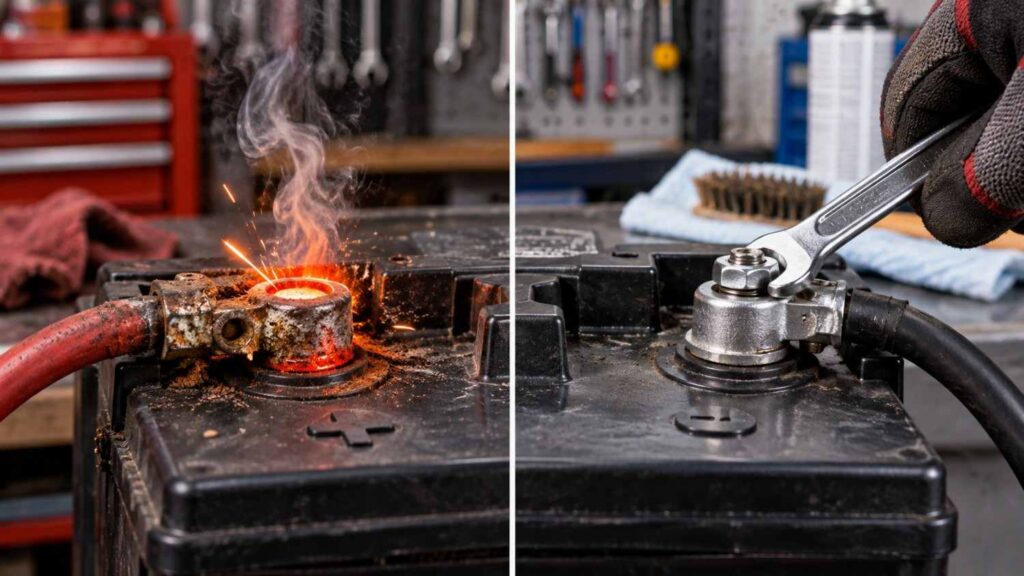
Hot terminals are almost never normal, and the underlying cause is usually simple enough to fix once you know what to look for.
This article walks through why battery terminals overheat, how to diagnose the specific cause, and the practical steps to fix and prevent it.
Why Heat Builds Up at Battery Terminals in the First Place
Heat at a connection point is almost always the result of electrical resistance, current flowing through a connection that is not making full, clean, low-resistance contact.
Ohm’s law tells us that resistance turns electrical energy into heat, so any point in the circuit with higher-than-expected resistance, whether from a loose bolt, corroded metal, or an undersized cable, becomes a hot spot as current flows through it.
In a healthy connection with proper metal-to-metal contact and adequate cable size, resistance is low enough that heat generation is negligible even under heavy load.
Common Causes of Hot Battery Terminals
- Loose terminal connections that have not been tightened properly or have vibrated loose over time.
- Corrosion buildup between the terminal and the battery post, covered in more depth in our dedicated corrosion article, which adds resistance at the contact surface.
- Undersized cables that cannot comfortably carry the current your inverter and appliances demand.
- Damaged or frayed cable ends making poor contact with the terminal clamp.
- Overloading the system beyond what the battery and wiring were designed to handle.
- Poor quality or worn-out terminal clamps that no longer grip the battery post firmly.
How to Diagnose the Specific Cause
Start by switching off the inverter and disconnecting the battery safely before inspecting anything, since working on hot or loose connections while current is flowing is a shock and short-circuit risk. Visually inspect the terminal for any greenish, whitish, or bluish crusty buildup, a clear sign of corrosion interfering with contact.
Check whether the terminal clamp can be wiggled by hand; any movement indicates it is not tightened sufficiently. Examine the cable itself for its gauge (thickness) relative to the current your system draws, and look along its length for any fraying, nicks, or damage near the terminal end.
Terminal Heat Causes and Fixes at a Glance
| Cause | How to Confirm | Fix |
|---|---|---|
| Loose connection | Terminal clamp wiggles by hand | Clean contact surfaces and retighten firmly |
| Corrosion | Visible crusty buildup on post or clamp | Clean with baking soda solution and wire brush, then reconnect |
| Undersized cable | Cable feels excessively warm along its length, not just at terminal | Replace with appropriately rated thicker cable |
| Damaged cable end | Visible fraying or exposed strands near terminal | Cut back and re-terminate, or replace cable |
| System overload | Heat appears mainly under heavy appliance load | Reduce connected load or upgrade wiring and battery capacity |
Step-by-Step: Fixing a Loose or Corroded Terminal
- Turn off the inverter and disconnect the battery from the system, negative terminal first for safety.
- Remove the terminal clamp from the battery post.
- Clean both the post and the inside of the clamp using a wire brush, removing all visible corrosion.
- Wipe the cleaned surfaces with a cloth to remove loose residue and dry thoroughly.
- Reattach the clamp to the post and tighten firmly with the appropriate spanner, checking that there is no wiggle.
- Apply a thin layer of petroleum jelly or a proper anti-corrosion terminal grease over the connection to slow future corrosion.
- Reconnect the battery, positive terminal first, and check terminal temperature again after a period of normal use.
Why This Is a Bigger Concern in Nigerian Conditions
Nigeria’s heat and humidity accelerate the chemical reactions that cause both corrosion and general wear at terminal connections, meaning a connection that might stay clean for years in a cooler, drier climate can develop problems much faster locally.
Homes running inverters daily due to frequent NEPA outages also put more cumulative current through their terminals than occasional-use systems elsewhere, which means any existing weakness in a connection gets tested more often and heats up more frequently.
This combination is part of why routine terminal inspection deserves a place in regular household maintenance, not just something to check when a problem is already obvious.
The Real Risk of Ignoring Hot Terminals
Beyond simply wasting energy as heat instead of delivering it to your appliances, a consistently hot terminal connection can eventually melt cable insulation, warp or damage the battery’s terminal post itself, and in worst cases create a fire risk, particularly where cables run close to combustible material in a poorly ventilated battery store.
A hot terminal is also frequently mistaken for a battery problem when the battery itself is perfectly healthy, leading some households to replace a good battery in naira they did not need to spend, when a simple terminal cleaning and retightening would have solved the issue.
Common Misconceptions
- “A hot terminal always means the battery itself is faulty.” Most hot terminal cases are caused by loose or corroded connections rather than the battery cell itself failing.
- “Tightening the terminal once during installation is enough forever.” Vibration, thermal cycling, and corrosion over time can loosen even a properly installed connection, so periodic rechecking matters.
- “Any amount of terminal warmth is completely normal under load.” Healthy, well-maintained connections should stay close to ambient temperature even under normal load; noticeable warmth signals a problem developing.
Frequently Asked Questions
How hot is too hot for a battery terminal to be considered a problem?
If a terminal is uncomfortable to hold your hand on for more than a couple of seconds during normal operation, it is hotter than it should be and needs inspection.
Can a hot terminal damage my inverter, not just the battery?
Yes, sustained voltage drop and resistance at a hot terminal can affect the power delivered to the inverter, and in severe cases the associated heat can damage nearby wiring or connectors.
How often should I check my battery terminals for heat or looseness?
A quick visual and touch check every one to two months is reasonable for most households, with a more thorough cleaning during routine battery maintenance every few months.
Final Thoughts
Hot battery terminals are almost always a sign of resistance at the connection point, whether from looseness, corrosion, undersized cabling, or damaged cable ends, rather than a fault in the battery cell itself. Diagnosing the specific cause is usually straightforward with a simple visual inspection and a wiggle test, and fixing it typically costs nothing beyond a little cleaning, tightening, and some anti-corrosion grease.
Given Nigeria’s heat and humidity and the frequency with which many households cycle their inverter batteries, terminal connections deserve regular attention rather than being ignored until a bigger problem develops. A few minutes of routine checking can prevent wasted energy, damaged cables, and an unnecessary battery replacement.